Shorthand for WindowsTM
Instructions for Entering Your Registration ID
The instructions on this page apply only to those who purchased a Shorthand
license and received a Registration ID.
Your Registration ID consists
of 3 pieces of information: a User ID, the Number of Users
and a License ID.
To activate Shorthand, you must enter your Registration
ID into Shorthand as follows:
STEP 1: If you haven't already done so, install Shorthand on your computer.
If you already have Shorthand installed on your computer, skip to the next step.
If you don't have Shorthand, you should download and install it by
clicking here.
STEP 2: Start the Shorthand program.
After installing Shorthand, launch Shorthand by double-clicking on the
Shorthand "SH" Desktop Icon.
Shorthand will do one of these:
- If your license has expired or if you have a trial license, Shorthand automatically displays
either the About window or the Shorthand Registration Box.
If you see either of these windows, skip
to STEP 5 or
STEP 6.
-
If you have a valid license, Shorthand displays a brief splash window then automatically hides itself.
Continue on to Step 3.
STEP 3: Bring up the Shorthand Main Window
When Shorthand is running you should see a small "SH" icon in the Windows System Tray (the small panel located at the
bottom right corner of your screen).
Click on the small Shorthand "SH" icon in the Windows System Tray to
bring up the Shorthand Main Window:

STEP 4: Bring up the About Window
In Shorthand's main window, select About from Shorthand's Help menu.

STEP 5: Bring up the Registration Window
Click the REGISTER button at the bottom of the ABOUT window.

STEP 6: Enter your Registration ID
Carefully enter your USER ID, NO. OF USERS, and LICENSE ID into
the Shorthand Registration Box.
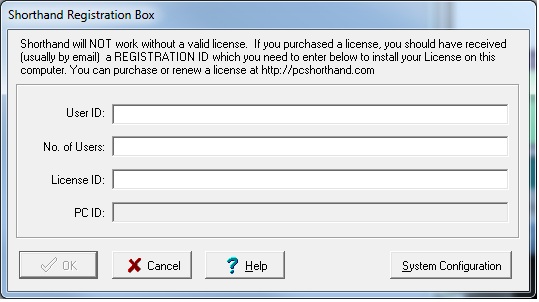
Please note:
-
The USER ID can be any string and is based on your
name or company name. If you have a temporary Registration ID, the USER
ID is a 4 or 7 digit number.
-
The NO. OF USERS is either the string "PC" or a number specifying the number of licensed users (e.g. "1").
-
The LICENSE ID is your serial number and uses only numbers 0 through 9
and letters A to F and X. There are no letter I's or letter O's in
the License ID.
- The PC ID is taken from your Windows serial number and hardware configuration and cannot be changed.
Tip:
To make sure you enter your Registration ID correctly, we suggest you copy and paste the ID strings from
the registration email we sent you directly into the Shorthand Registration Box window.
STEP 7
Click the OK button. If the Registration ID was entered correctly,
Shorthand displays the About window again.
Click OK to close the About window.
NOTE: If the Registration ID doesn't work, try re-entering it again.
Sometimes you have to enter the Registration ID twice for it to take effect.
STEP 8
Keep your Registration ID in a safe place. You may have to re-enter
the Registration ID in the event of a disk crash or if you upgrade to a
new Windows operating system.
Important!
Please note that your Registration ID is unique and may be used only
by the person (for User Licenses) or company (for Site Licenses) that purchased
the Shorthand License; it is illegal to give or share your Registration
ID with unlicensed users.
Home | Download
| Purchase | Questions |
Mailing Lists | Contact
Us
https://www.pcshorthand.com